Spill

BETA 0.4

Live vocal de-noise you tune by ear.

Spill pulls drum and stage spill out of vocal mics in real time. A small neural network hears what's singer and what isn't, and you decide how far it goes: cut hard where the spill lives, and ease off wherever the vocal needs its air and body.

There's no lookahead, so it sits on a live vocal with about 2.4 ms of added delay.

Spill app icon: a drop of water
2.4 ms
ADDED DELAY
1 ms
GAIN UPDATE RATE
4 bands
STRENGTH CURVE YOU SHAPE
AU + VST3
PLUGINS, PLUS AN APP
noise vs vocal

Balance the noise reduction against the vocal

More cut means a cleaner channel, but push too far and the vocal starts to lose its top end and its life. Spill gives you the controls to find that line for each singer, by ear, while the band plays.

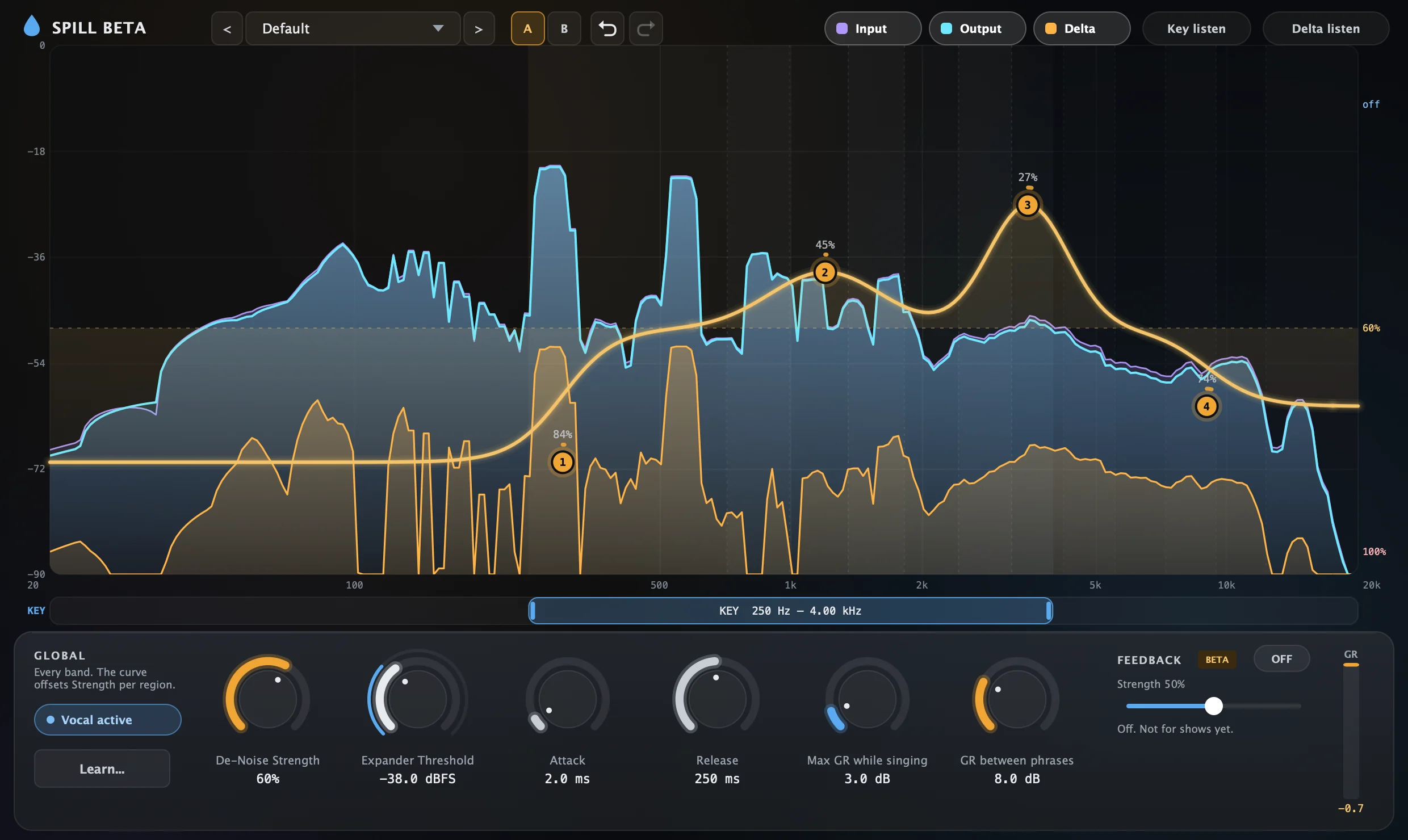
The Spill Beta plugin on a live lead vocal mic, mid-phrase: an RTA with the input in violet, the output in cyan and what Spill removed in amber, under an orange strength curve with four nodes. Below it, the global knobs: De-Noise Strength 60%, Expander Threshold, Attack, Release, Max GR while singing and GR between phrases.

De-Noise Strength

One knob for how hard Spill cuts the spill, across every band. It's the first thing to set, and the curve works from it.

A strength curve you can shape

A low shelf, two bells and a high shelf, drawn over a live RTA. Pull a node down to cut harder where the kick and snare live; push it up to leave the vocal's body or air alone.

Gentle while they sing

Spill knows when the singer is singing. Max GR while singing caps the cut so the vocal stays natural, and GR between phrases clears the channel when they stop. Threshold, attack and release set how it moves between the two.

Hear what it takes out

The RTA shows the input, the output and what was removed, on top of each other. Delta listen plays only what Spill is removing: if you can hear the singer in it, back it off.

Tell singers apart

Set the key range to the part of the spectrum that's this singer, or compare against the other vocal mics, so a backing vocalist's bleed doesn't count as the lead singing.

A/B, undo and presets

Flip between two settings mid-song to compare them, undo any change, and save what works as a preset for the next show.

Listens, then gets out of the way

Spill doesn't gate the vocal, and it doesn't look ahead into the audio. The audio passes straight through a filterbank, and the model only ever adjusts band gains based on what it has already heard.

Nothing waits for future audio, so the only delay Spill adds is the filterbank's own.

01
Split into bands
A causal filterbank splits the vocal channel into frequency bands. The audio itself passes straight through.
02
Listen to the last 10.7 ms
Once every millisecond, a small recurrent neural network looks at the most recent audio.
03
Set each band's gain
It decides how much of each band is singer and how much is spill, and sets the band gains for the next millisecond, scaled by your strength and curve.
04
Recombine
The bands are summed back together, with the spill turned down and the vocal left alone.
built for the mix position

What you get

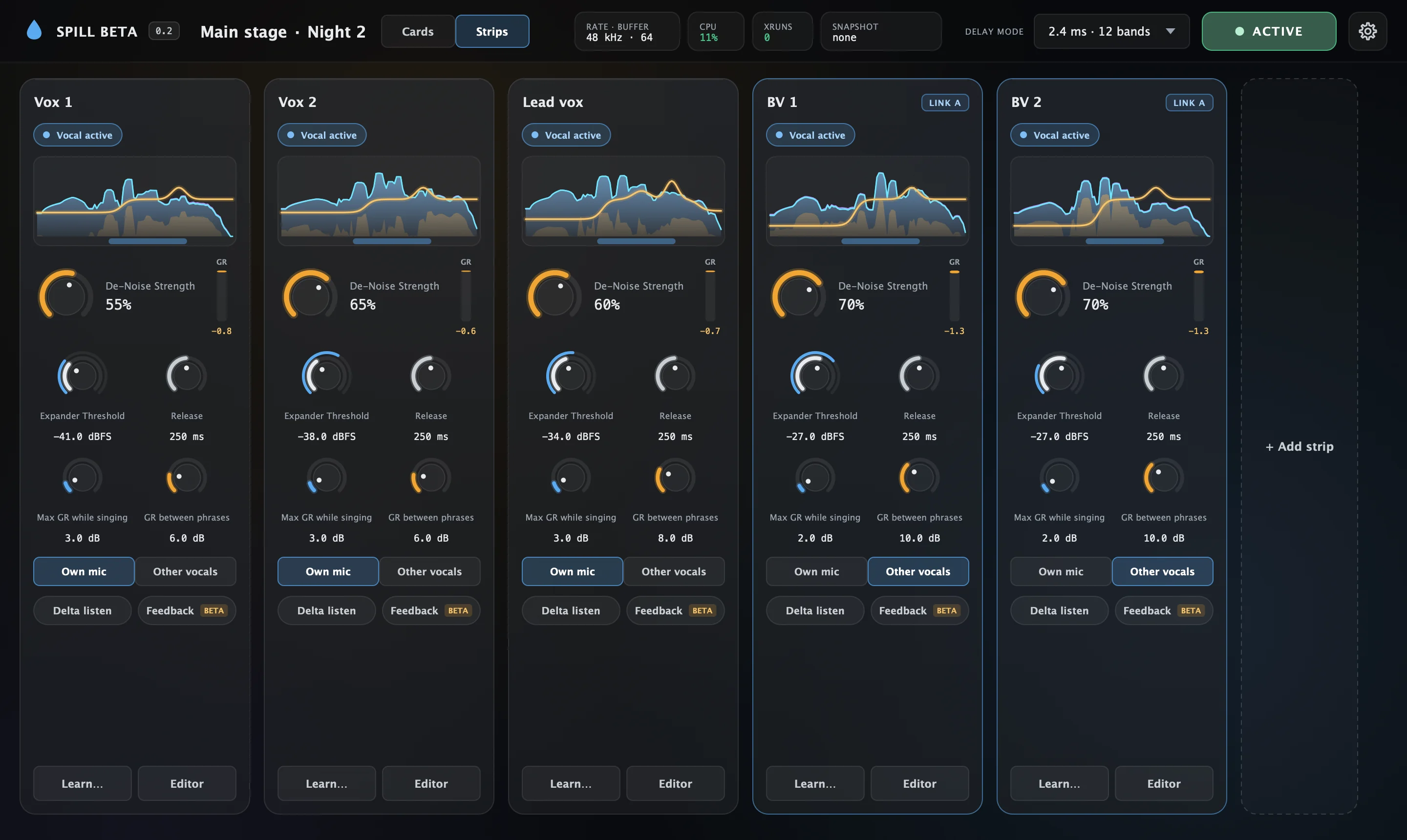
The Spill Beta standalone app in the Strips view, ACTIVE, with five vocal strips side by side: each has a state pill reading Vocal active, a small RTA with its strength curve, a De-Noise Strength knob with a gain reduction meter, four vocal-aware knobs, Own mic or Other vocals, Delta listen, Feedback, Learn and Editor. The two backing vocal strips are marked LINK A. The header shows 48 kHz, a 64-sample buffer, CPU 11% and no xruns.

AU and VST3 plugin

Drop it on a vocal channel in any AU or VST3 host on your FOH Mac, Waves SuperRack included, mono or stereo. The editor is built around the RTA, so you set it by looking and listening.

Standalone multi-strip app

Run every vocal mic in one app, with no plugin host needed. Each strip shows its own RTA and everyday controls side by side, with one master active / bypass switch and snapshot recall for the whole show.

Learn in 20 seconds

A short wizard listens to the band without the singer, then the singer alone, for about 10 seconds each, and sets the threshold for that vocal mic.

Never mutes

If the licence is missing or expired, Spill passes the vocal through dry, latency-matched, exactly like bypass. It never cuts the vocal.

Safe mid-show

Your licence is only checked when Spill loads. Once it's running, nothing changes until you close it.

Works offline

No account, no server and no internet connection needed. It works the same in a venue with no wifi.

requirements
MAC
Apple silicon (M1 or later)
SYSTEM
macOS 13 or later
FORMATS
Audio Unit, VST3, standalone app
SOURCES
Vocals for now, other sources later

Request the Spill beta

Spill is in a small, closed beta. Each tester gets their own licence, so it isn't a public download yet.

It's free while it's in beta. In return I'd like to hear how it sounds on your shows and what breaks.

  1. Send the form with a bit about your setup.
  2. I'll email you the installer and your personal licence file.
  3. Install both, run Learn on your vocal mics, and send me feedback.